Shopware 6 + OpenAI: Automated SEO Metadata Generation
Table of Contents
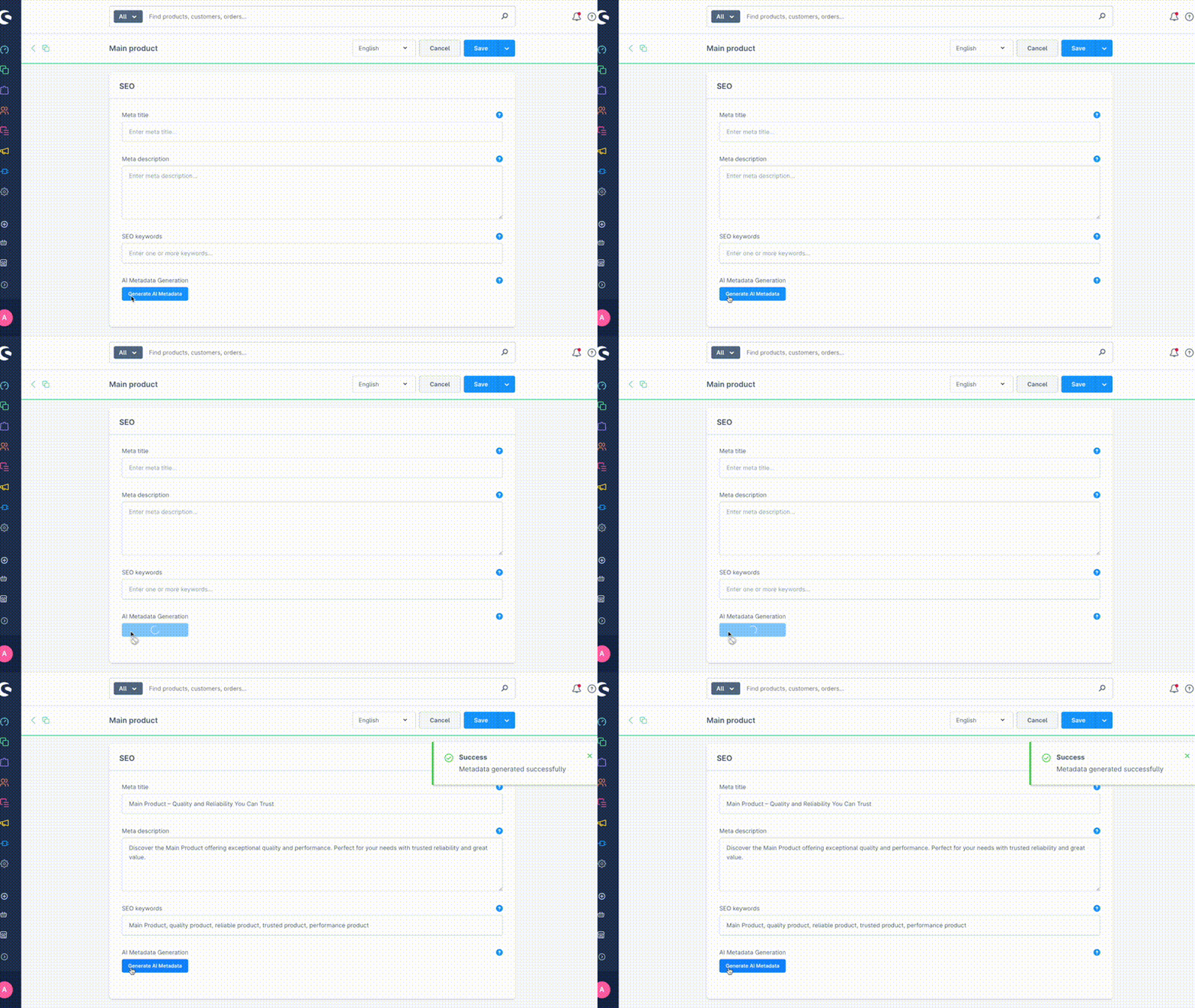
We’ve all been there: hundreds of products in the shop, but the SEO metadata is still using default placeholders or carelessly copied text. Through my experience integrating AI into Shopware projects for clients, I knew how much time could be saved on repetitive tasks. So I thought: metadata generation would be a perfect use case for automation. The result is a plugin that uses the OpenAI API for automatic metadata generation.
What makes it interesting
Context-aware multilingual support
private function getLocaleFromLanguageId(string $languageId, Context $context): string
{
    $criteria = new Criteria([$languageId]);
    $criteria->addAssociation('locale');

    $language = $this->languageRepository->search($criteria, $context)->first();
    return $language?->getLocale()?->getCode() ?? 'en-GB';
}
The plugin automatically detects the current language from the Shopware context and generates metadata in the corresponding language. German products get German meta descriptions, English products get English ones – without manual configuration.
Structured prompting for consistent results
private function buildPrompt(string $productName, string $description, string $locale): string
{
    return sprintf(
        "Generate SEO-optimized meta title, meta description, and keywords for this product in locale '%s':\n\n" .
        "Product Name: %s\nDescription: %s\n\n" .
        "Return as JSON: {\"metaTitle\": \"...\", \"metaDescription\": \"...\", \"keywords\": \"...\"}",
        $locale, $productName, strip_tags($description)
    );
}
Instead of vaguely asking “generate SEO texts for me”, the API receives specific instructions with character limits and format requirements. The result: consistent, usable metadata.
Frontend integration without core hacks
Component.override("sw-product-seo-form", {
  template,

  computed: {
    canGenerateMetadata() {
      return this.product?.name?.trim() && this.product?.description?.trim();
    },
  },

  methods: {
    async onGenerateMetadata() {
      const response = await this.aiMetaGeneratorApiService.generateMetadata({
        productId: this.product.id,
        productName: this.product.name,
        description: this.product.description,
        languageId: Shopware.Context.api.languageId,
      });

      if (response.success) {
        this.updateProductMetadata(response.data);
      }
    },
  },
});
A simple button in the SEO tab that extends the existing component. No core code is touched, updates are seamless.
What I learned along the way
Administration UI extension is more elegant than expected
Component.override("sw-product-seo-form", {
  computed: {
    canGenerateMetadata() {
      return this.product?.name?.trim() && this.product?.description?.trim();
    },
  },
});
Extending the existing SEO form was surprisingly clean. Shopware’s Component System allows you to “override” existing components without touching the core code. The button appears exactly where it belongs.
Language synchronization between frontend and backend
// Frontend: Explicitly transfer current language
const currentLanguageId = Shopware.Context.api.languageId;
const requestData = {
  productId: this.product.id,
  productName: this.product.name,
  description: this.product.description,
  languageId: currentLanguageId, // Important!
};
// Backend: Create context for the correct language
$requestLanguageId = $data['languageId'] ?? null;

if ($requestLanguageId && $requestLanguageId !== $context->getLanguageId()) {
  // Create new context with frontend language
  $context = new Context(
    $context->getSource(),
    $context->getRuleIds(),
    $context->getCurrencyId(),
    [$requestLanguageId], // Use frontend language
    $context->getVersionId(),
    // ... additional context parameters
  );
}
The backend has no direct access to the current administration language. When a user is working in the German administration, the backend doesn’t automatically know that German metadata should be generated. The language ID must be explicitly transferred from the frontend and a new context with the correct language must be created in the backend.
Without this synchronization, the plugin would always generate metadata in the default language, regardless of which language the user is currently working in.
Vue.js reactivity in Shopware Administration
updateProductMetadata(metadata) {
  if (metadata.metaTitle) {
    this.product.metaTitle = metadata.metaTitle;
  }
  if (metadata.metaDescription) {
    this.product.metaDescription = metadata.metaDescription;
  }
  if (metadata.keywords) {
    this.product.keywords = metadata.keywords;
  }
  this.$emit("product-changed"); // Important for dirty state
}
Shopware’s Administration is based on Vue.js and follows the principle that props should not be directly mutated (Vue.js anti-pattern). Instead, changes are communicated to the parent component via events. The product-changed event signals to the Shopware Administration that product data has changed, which correctly manages the “dirty state” - similar to v-model binding between parent and child components.
This pattern is standard in Shopware’s Component System, as also used in What means the “element-update” in Shopware 6?
Why open source?
After various AI integration projects for clients, it became clear to me how universal the metadata generation problem is. Almost every shop owner struggles with it. So I thought: Why not develop a clean, reusable solution and share it with the community?
The plugin is intentionally minimal – no complex configurations, no UI overload. One button, one API call, done. Based on what’s actually needed in client projects.
Try it yourself
git clone https://github.com/yterasaka/sw-ai-meta-generator
bin/console plugin:install --activate AiMetaGenerator
Add your OpenAI API key in the plugin settings, and you’re good to go. The plugin is free, but requires an OpenAI API key (a few cents per generation).
Sounds interesting? Feedback and pull requests are welcome. I’m especially curious about experiences with other languages and edge cases.
If you find the plugin useful, I’d appreciate a GitHub star! ⭐
Repository: https://github.com/yterasaka/sw-ai-meta-generator